Fraud detection is one of the main reasons to integrate IP data into your application or service, and impossible travel detection is one of the most common techniques. Impossible travel detection uses IP geolocation data to spot when a user's location changes faster than anyone could physically travel. For example, a user might log in from Germany and then, just an hour later, from the United States. Patterns like this can point to fraud or account takeover. This article shows you how to implement impossible travel detection using IP Trust geolocation data.
Calculating distance between locations
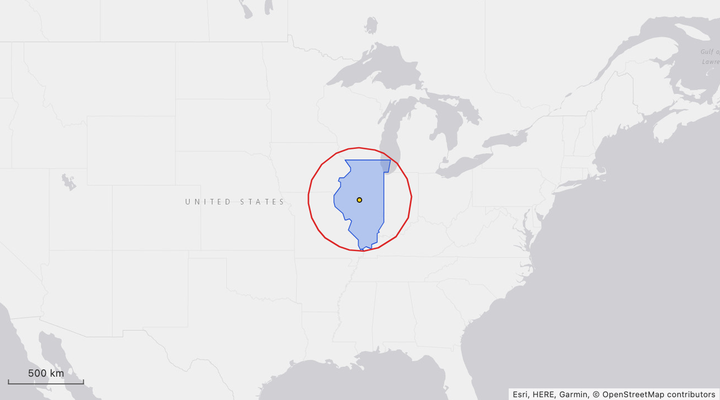
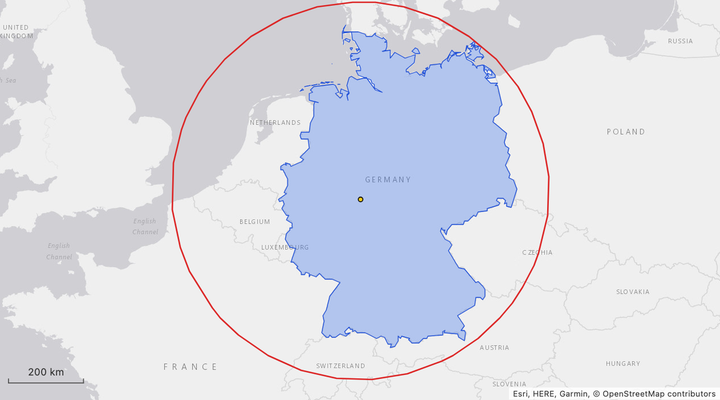
As part of our geolocation data, IP Trust provides an area object that describes the area we believe the IP location is contained within. The area respects the resolution property; so for example, where we have country-level accuracy (indicated by resolution:"country"), the longitude and latitude will be a central point within the country, with the radius_km describing a circle from that point that encloses the country borders. The same applies to resolution:"city" and resolution:"state".
Here are a few examples:
{
 "ip": "94.247.86.10",
 "location": {
  "resolution": "city",
  "city": "London",
  "state": "England",
  "country": "United Kingdom",
  "latitude": 51.509,
  "longitude": -0.126,
  "area": {
   "latitude": 51.509,
   "longitude": -0.126,
   "radius_km": 20
  }
 }
}
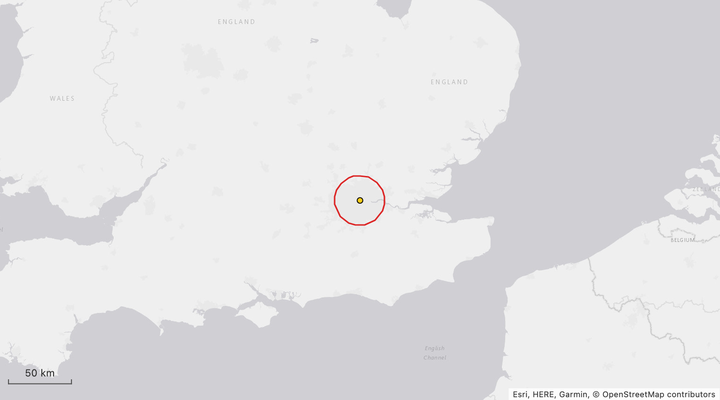
The area here describes an IP located within London:
The next example shows a state-level resolution for an IP in Illinois, US:
{
 "ip": "68.180.17.10",
 "location": {
  "resolution": "state",
  "city": "Chicago",
  "state": "Illinois",
  "country": "United States",
  "latitude": 41.85,
  "longitude": -87.65,
  "area": {
   "latitude": 40.08,
   "longitude": -89.434,
   "radius_km": 345.2
  }
 }
}
And finally, a country-level IP located in Germany:
{
 "ip": "92.78.20.10",
 "location": {
  "resolution": "country",
  "city": "Berlin",
  "state": "Berlin",
  "country": "Germany",
  "latitude": 52.524,
  "longitude": 13.411,
  "area": {
   "latitude": 51,
   "longitude": 9,
   "radius_km": 507.2
  }
 }
}
Note that the
latitudeandlongitudecoordinates defined at the toplocationlevel represent the centroid coordinates for the providedcity. Even when resolution iscountryorstate, IP Trust provides a sensible default city value. For impossible travel detection, always use the coordinates provided inarea.
Once we have two areas, the Haversine formula can be used to calculate the distance between their centers. Existing implementations are available in many languages; below is a version in Go that returns the distance in kilometers between two sets of longitude and latitude coordinates:
func haversineKm(lat1, lon1, lat2, lon2 float64) float64 {
	const earthRadiusKm = 6371.0

	rad := math.Pi / 180
	dLat := (lat2 - lat1) * rad
	dLon := (lon2 - lon1) * rad

	h := math.Pow(math.Sin(dLat/2), 2) + math.Cos(lat1*rad)*
		math.Cos(lat2*rad)*
		math.Pow(math.Sin(dLon/2), 2)

	return 2 * earthRadiusKm * math.Asin(math.Sqrt(h))
}
We can then calculate the minimum distance between the two circular areas by subtracting both radii from the returned distance:
type Area struct {
	Latitude   float64
	Longitude  float64
	RadiusKm   float64
}

func minDistanceKm(a, b Area) float64 {
	d := haversineKm(a.Latitude, a.Longitude, b.Latitude, b.Longitude)
	d -= a.RadiusKm + b.RadiusKm

	// Overlapping areas are 0.
	return math.Max(d, 0)
}
This gives us everything we need to calculate the distance between any two IP locations returned from IP Trust.
Detecting impossible travel
To detect impossible travel we can capture the location and time of the user's login and compare it to the previous login. We then calculate the minimum speed the user would have had to travel at to move between those locations in that time. If this speed is greater than some threshold (a common approach is to use 900km/h, the typical cruising speed of most commercial airliners), we can flag the login as suspicious.
Using the IP addresses from our earlier examples: if the user logged in from 94.247.86.10 (London) at 9:00am 1st Oct UTC, and then logged in from 68.180.17.10 (Illinois) at 11:30am 1st Oct UTC, the minimum distance between those areas is ~6,235km, meaning they would have had to travel at ~2,500km/h, far greater than our 900km/h threshold.
We can calculate this with the following Go code that uses our previous functions:
func main() {
	// We hardcode the data here but this would be read from the
	// IP Trust API or the IP Trust database download.
	london := Area{
		Latitude:  51.509,
		Longitude: -0.126,
		RadiusKm:  20.0,
	}
	illinois := Area{
		Latitude:  40.08,
		Longitude: -89.434,
		RadiusKm:  345.2,
	}

	londonTime, _ := time.Parse(time.RFC3339, "2026-10-01T09:00:00Z")
	illinoisTime, _ := time.Parse(time.RFC3339, "2026-10-01T11:30:00Z")

	distance := minDistanceKm(london, illinois)
	fmt.Printf("Distance from London to Illinois: %7.1f km\n", distance)

	speedKmh := distance / (illinoisTime.Sub(londonTime).Hours())
	fmt.Printf("Travel Speed: %7.1f km/h\n", speedKmh)

	const thresholdSpeedKmh = 900
	if speedKmh > thresholdSpeedKmh {
		fmt.Printf("Impossible travel detected\n")
	}
}
Including territories
One of the challenges of using a coordinates plus enclosing radius approach is that, in the case of resolution:"country", some countries include overseas territories or territories outside of the main landmass, such as Alaska and Hawaii. Using a single centroid coordinate plus radius to cover all such territories can create a circle that ends up so large it becomes almost useless for impossible travel detection - anywhere in the world is reachable in a reasonable time from the edges of the circle.
To resolve this, IP Trust also provides a territories property on area. This provides a list of separate coordinate plus radius values for each separated territory, where relevant. For example, the country level area for the US includes the following territories covering Alaska and Hawaii:
{
 "ip": "75.40.220.10",
 "location": {
  "resolution": "country",
  "city": "New York City",
  "state": "New York",
  "country": "United States",
  "latitude": 40.714,
  "longitude": -74.006,
  "area": {
   "latitude": 38,
   "longitude": -97,
   "radius_km": 2605.5,
   "territories": [
    {
     "latitude": 58.984,
     "longitude": -152.168,
     "radius_km": 1399.5
    },
    {
     "latitude": 21.3,
     "longitude": -158.339,
     "radius_km": 419.2
    }
   ]
  }
 }
}
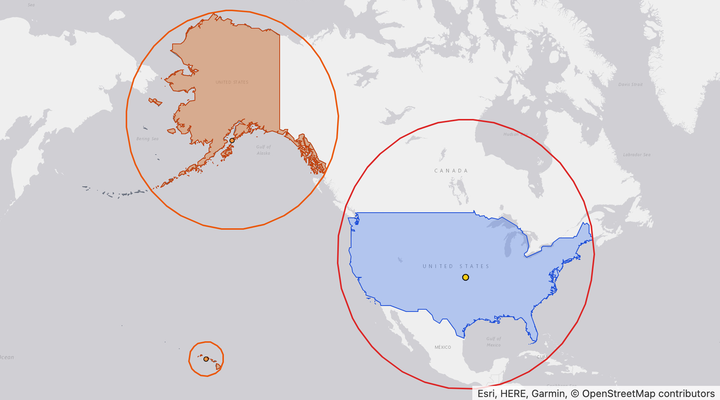
Excluding territories means a higher chance of false positives. For example, imagine a user in Anchorage, Alaska, who flies to Tokyo and logs in 7.5 hours later. If you only measure from the US mainland, the closest point is at least 7,330 km from Tokyo, so they would have needed to travel at around 980 km/h, and the login could be flagged as impossible travel. From Alaska, though, the distance is closer to 5,560 km, which works out to about 740 km/h. That's below the normal cruising speed of a commercial jet, so it's a perfectly ordinary flight.
Conversely, including territories means a higher chance of false negatives. If a user logs in from New York and then 5 hours later a login for the same account comes from Tokyo, checking only the mainland gives a speed of over 1,400km/h and the login is flagged. But the Alaska territory is only 4,050km from Tokyo, so if territories are included the required speed drops to around 810km/h and the login is allowed, even though New York to Tokyo is a 14 hour flight.
This trade-off is unavoidable when dealing with country-level resolution, so you should decide what approach makes most sense for your own application.
Limitations and possible enhancements
Although the coordinates plus radius approach used in IP Trust is simple to understand and implement, it's not perfect. In many cases, especially at country-level, the enclosing circle can cover a large excess area. This makes worst-case country to country comparisons in particular overly forgiving. For example, compare the country to country distance between Germany and China:
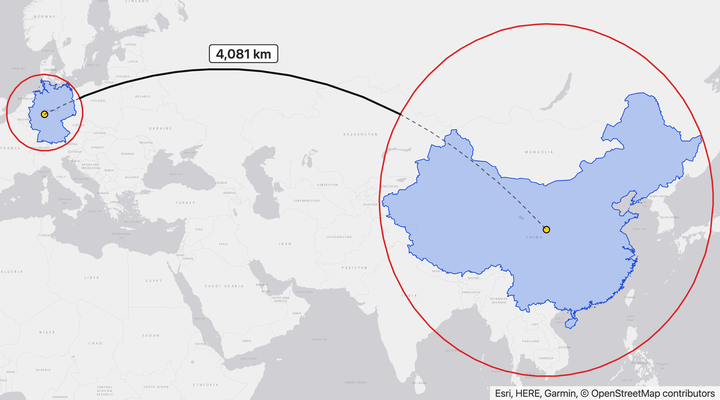
The enclosing country circles have a minimum distance of 4,081km (minimum travel time of 4.5 hours at 900km/h), but this is much less than most actual city to city travel between the two countries. For example, Frankfurt to Shanghai is about 8,820km, a roughly 10 hour minimum travel time.
Another complicating factor is tools that mask the user's real location, such as VPNs and Residential Proxies. These can result in false negatives (where a fraudulent transaction only appears to originate from the user's usual location) and also false positives (where a real user is connected to a VPN in a different country and attempts to log in).
For these reasons, impossible travel detection on its own is not a guaranteed signal of fraud. Like any fraud detection approach, impossible travel is most effective when combined with other signals to provide an aggregated risk assessment. Other signals that can be implemented with IP Trust data include:
- Does the request come from a hosting provider?
- Does the request come from a high risk ASN?
- Does the request come from an IP known to have hosted Residential Proxies?
- Does the request come from a VPN the user has never used before?
All of these factors can be combined into a risk score that you can act on once it passes some threshold, or use to take different levels of action depending on the risk.
Getting started with IP Geolocation
If you are interested in implementing impossible travel detection in your application, you can sign up for a free IP Trust account now.
IP Trust's IP Geolocation database is free to download and use, including commercial use, for companies with fewer than 20 employees and under €1M in annual revenue. If you don't meet these criteria, the database is still available to purchase - unlike some of our competitors, we openly publish our database download prices on our website.
All IP Trust accounts also come with 10,000 free API requests a month, where you can access all data fields. You can also contact our team if you have any further questions.